InstaPay/Gini is an interface. It does not issue cards, operate wallets in the regulatory sense, or hold customer funds. References to “wallet” are for convenience only.
InstaPay Gini is an investment administration interface that lets you manage your contributions, disbursements, and payments conveniently. While it is sometimes described as a “wallet” for ease of communication, your funds are held by licensed custodians or nominee institutions, not by InstaPay or Omnea.
You can contribute via bank transfer, card, or other supported payment methods. These contributions are routed directly into a custodial account in your name. InstaPay/Omnea does not hold or custodise your funds.
Withdrawal or disbursement instructions (e.g., to a bank account, cash voucher, or bill payment) are processed by the custodian or fund administrator according to their rules. InstaPay does not hold funds or process withdrawals directly.
All transfers are instructions to third-party institutions, not internal transfers within InstaPay.
Yes. You can manage multiple profiles or interfaces within InstaPay. The underlying accounts, however, remain with licensed custodians or banking institutions.
While the interface may reflect updates immediately, all contributions, disbursements, and fund movements are subject to the custodian’s rules and settlement times. Real-time display does not mean InstaPay holds the funds or can guarantee immediate availability.
Your funds are held safely with regulated, independent custodians or nominee institutions. InstaPay/Omnea simply provides the interface—you retain ownership of your funds at all times.
InstaPay is a comprehensive Merchant Solutions platform designed to empower businesses with cutting-edge features for seamless transactions and efficient business management. It offers a range of tools, including in-app marketing, internal controls, transaction analytics, and value-added services to streamline operations, boost profitability, and enhance customer engagement.
When you register with InstaPay, you gain immediate access to a variety of features, including in-app marketing tools, sophisticated internal controls, transaction analytics, and the ability to diversify revenue through value-added services like airtime, electricity, and DSTV sales.
InstaPay offers flexibility through both a web portal and a mobile app, allowing you to manage payments, handle payroll, pay salaries, and even manage waiter tips for restaurants. It supports various secure money transfer methods such as EFT, Wallet to Wallet, Wallet to Card, QR Code, Tap on Glass (NFC), and Cash-in and Out at 3rd Party Retailer/Agent.
InstaPay offers tailored solutions for businesses of all sizes: Business Manager, POS Core, POS Plus, and POS Pro. Each option provides varying levels of access to the web portal, app, and advanced POS devices, allowing businesses to choose the solution that best fits their needs.
InstaPay's Payment Gateway ensures secure, fast, and reliable online payment processing. It offers three flexible options: Plugin for WooCommerce, Point of Sale (PoS) System Integration for in-store and online operations, and API-based Payment Requests with dynamic endpoints, batch processing and more.
Choosing InstaPay comes with several benefits, including access to the lowest transaction fees in SA, integrated features in a single application, a consolidated POS device, reliable compliance with robust KYC and AML features, efficiency with user-friendly tools, enhanced customer engagement, secure and encrypted payment processing, insightful analytics, and versatile solutions tailored to your business needs.
To unlock a world of seamless transactions and powerful business management tools, simply onboard for free today. Sign up now to begin your journey with InstaPay, and join our community of satisfied merchants.
If you have any questions or need more information about how InstaPay can transform your business, our team of experts is ready to assist you. Contact us with your inquiries, and we'll provide you with all the details you need to make informed decisions.
A: Log in using the unique internet portal address provided in the email from do-not-reply@instapay.co.za.
A: Yes, individuals can register multiple business accounts accessible from a single portal.
A:Click on "Logged in as," then select "Own Profile" to update display name, email, and mobile number.
A:Navigate to the "Transaction History" section to access detailed transaction information and statements.
A: Yes, customize the transaction list view by choosing fields for display and using date-based viewing and filtering options.
A: Export transaction data as Excel, CSV, or PDF files.
A: Go to "Make Payments" and select "Single Payment" to complete the payment process.
A: Yes, choose "Upload a Bulk File" under "Make Payments" for simplified salary or supplier payments.
A: Use the "Request Payment" section and select "Single Payment Request" to send payment requests via QR code, email, or SMS.
A: Yes, navigate to "Upload a Bulk File" under "Request Payment" for handling payment requests from multiple customers.
A: Use the "Transfer" section and select "Transfer from Bank Account" to transfer funds.
A: Visit the "Connect Counterparties" section and follow instructions under "Beneficiary Accounts" and "Invitations."
A: Access "System Administration" and go to "Membership" -> "Business Profile" to update business details.
In "System Administration," under "Membership" -> "Bank Accounts," add, edit, or delete external bank accounts.
A: Email support@instapay.co.za for InstaPay Money Manager account queries or requests.
A: Contact your Account Manager during business hours (Mon-Fri 08h00-17h00) for additional training, fee structures, and information on card machines.
A: Tap “Pay” in your Catalogue, then choose how you'd like to pay:
A: Yes! Just use the ATM Withdrawal Link. Enter their mobile number, amount, and they’ll get a voucher to withdraw cash at an ATM. You can even transfer funds into their bank account by clicking “Pay Beneficiary”
A: Anyone can scan your personal QR code using a Masterpass-enabled app (like major bank apps) to send money directly to your Instapay Account.
A: Tap “History” on the bottom menu to view and filter all your transactions by date or category.
A: Absolutely! Tap “Analytics” in the bottom menu to view trends by day, week, or month.
A: Visit the Cashback Partners section, tap a store logo to get your personal QR code, and show it to the cashier when you pay. Cashback is added instantly!
A: We’ve partnered with over 30 popular South African brands. Check the Cashback Partners section in your app for the full list.
A: Scroll down your home screen to explore nearby merchants and offers. Or tap “View All” under Offers for a complete list.
A: Yes! Tap Menu → Customise Catalogue, and choose the features you use most. They’ll appear in your Quick Access bar.
A: We’ve partnered with over 30 popular South African brands. Check the Cashback Partners section in your app for the full list.
A: Tap Menu → Settings to change your PIN, update sign-in options, and manage notifications.
A: Go to Wallet → Money In. You can add funds:
A: Yes! Tap “From Store”, show the barcode to the cashier, and pay with cash or card. Visit our website for a list of partner stores.
A: Go to Wallet → Money Out, and choose:
A: Yes! Tap Lifestyle → Buy Electricity, enter your meter number and amount, and receive your token instantly.
A: Absolutely. Go to Lifestyle → Mobile Top Up to buy airtime or data for any major South African network.
A: Yes. Just go to Lifestyle → Pay DSTV, enter your account details, and complete your payment.
A: You can pay bills to most major service providers right from the app. Tap Lifestyle →Bill Payments to get started.
A: Tap Menu → Help & Support to access FAQs or start a live chat with our support team. You can also email support@instapay.co.za and we will call you back.
A: Yes. Go to Menu → Settings to manage your PIN and other security settings.

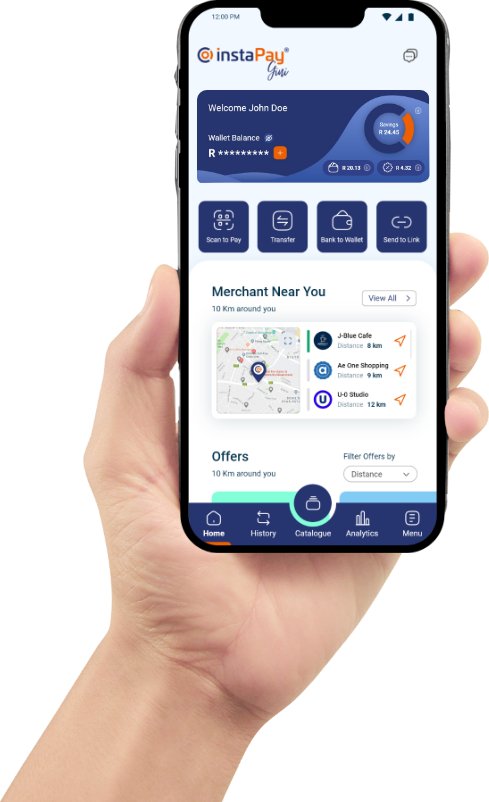
Discover the future of payments with InstaPay, where innovation meets trust, and convenience is the norm. Join our ecosystem today, and experience a new era of digital commerce with a network you can rely on.


Together with our trusted partners, we're shaping the future of commerce.





Discover the future of payments with InstaPay, Where innovation meets trust, and convenience is the norm



© OmneaPay 2026, All rights reserved.

 Download
App
Download
App